
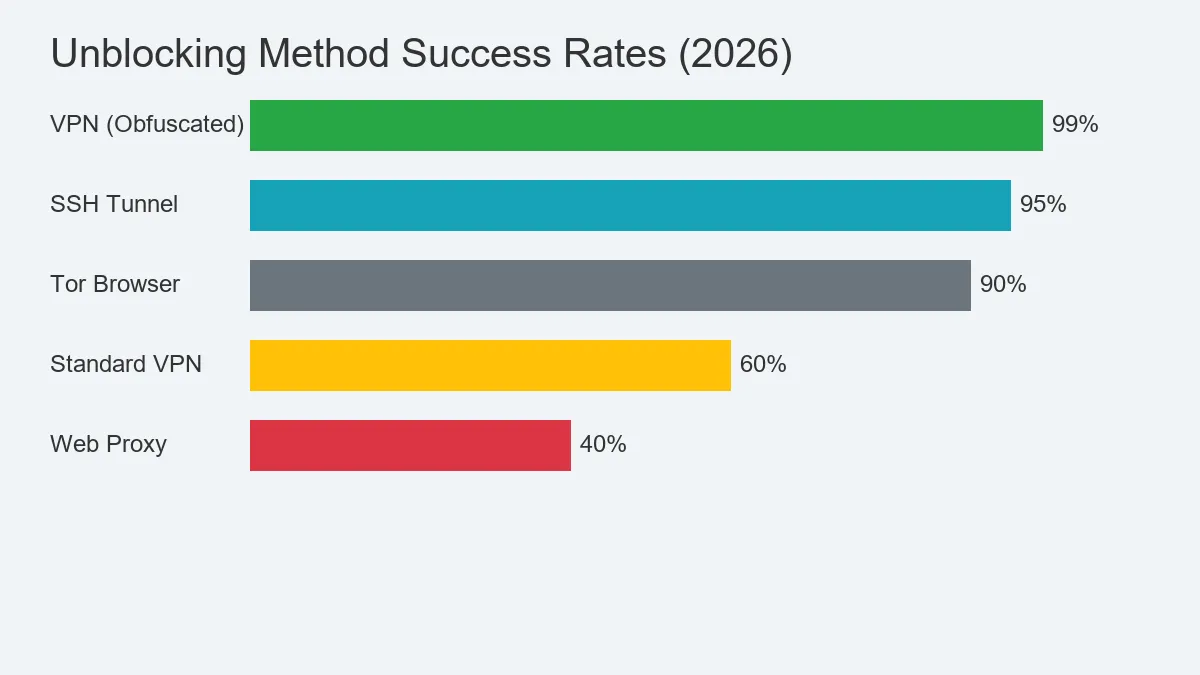
🚀 Quick Access Fix
Blocked at School or Work? A standard VPN might be detected. You need Obfuscation (Scramble).
The Fix: Use IPVanish with the “Scramble” protocol enabled. It disguises your VPN traffic as regular HTTPS browsing, bypassing even strict firewalls.
Network admins often think they’re ahead of the game. They block YouTube, restrict Instagram, and likely filter your news sources. Some go further, using Deep Packet Inspection (DPI) to sniff out anyone trying to tunnel out.
But here is the secret: Every firewall has a loophole.
I’ve testing dozens of methods on how to access blocked websites. We aren’t talking about basic DNS changes here. From SSH tunneling to obfuscation, I’ll show you the “Grey Hat” techniques that work right now. This isn’t just about unblocking sites; it’s about becoming invisible. Check out our Travel Security guide if you’re taking these tricks abroad.
Method 1: The “Nuclear” Option – VPN with Obfuscation
Most articles tell you to just “use a VPN.” They are half-right. If you are on a sophisticated network (like a customized school firewall or in a restrictive country), a regular VPN connection stands out like a sore thumb. The firewall sees the “OpenVPN” header and blocks it immediately.
The Solution: Traffic Obfuscation.
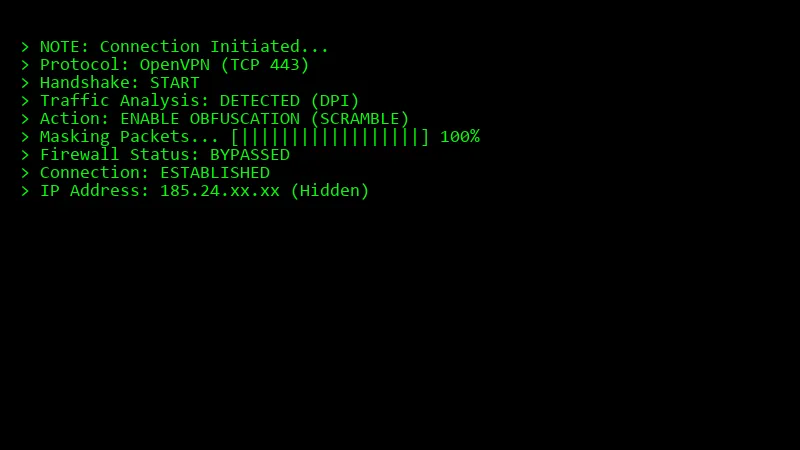
You need a VPN that supports “Scramble” or “Stealth” mode. This technology strips away the VPN metadata and wraps your encrypted data to look like regular HTTPS traffic (the same code used when you visit Google or Amazon). To the firewall, you look like you’re just browsing Wikipedia.
How to set it up:
- Download IPVanish (it has the best “Scramble” implementation).
- Go to Settings > Connection.
- Check the box for “Scramble (OpenVPN)”.
- Connect to a server (TCP port 443 is best).
Now, how to access blocked websites is no longer a question of “if”, but “how fast”.
Method 2: SOCKS5 Proxies (The Speedster)
If encryption isn’t your priority and you just need raw speed—say, for lag-free gaming or streaming—a SOCKS5 proxy is the tool of choice. Unlike a full VPN, it doesn’t wrap your entire machine in a protective layer. It creates a tunnel specifically for the app you configure it with.
Pros:
- Zero encryption overhead means raw speed.
- Perfect for bandwidth-heavy tasks like Torrenting.
- Instant IP swapping.
Cons:
- Since the data payload isn’t encrypted, your ISP can technically still inspect the packets if they look closely.
Method 3: DoH (DNS over HTTPS)
Sometimes, the block is lazy. The firewall simply blocks the DNS request. For example, you type “facebook.com”, your computer asks the network’s DNS “Where is Facebook?”, and the DNS says “Blocked”.
The Fix: Bypass the network’s DNS entirely.
You can bypass this by pointing your browser to a secure provider like Cloudflare (1.1.1.1). Using DNS over HTTPS (DoH) puts your request in a secure, encrypted envelope. The network admin sees traffic, but they can’t read the address on the letter inside.
Enable in Chrome:
- Settings > Privacy and security > Security.
- “Use Secure DNS” > Select “Cloudflare (1.1.1.1)”.
Method 4: SSH Tunneling (The “Nerd” Way)
This approach is for the hands-on tech crowd. If you have a machine at home—Linux, Mac, or Windows—running outside the restrictive network, you can build a secure tunnel right to it.
You basically turn your home rig into your own personal VPN. Traffic flows from your restricted laptop -> through the encrypted SSH tunnel -> to your home PC -> out to the web.
The Command (Mac/Linux):
ssh -D 8080 -f -C -q -N user@your-home-ip
Once that tunnel is dug, just point your browser’s SOCKS settings to localhost:8080 and you are surfing through your home connection.
Method 5: The Tor Browser (Maximum Anonymity)
We can’t talk about unblocking without nodding to The Onion Router (Tor). While VPNs try to balance speed and privacy, Tor goes all-in on being a ghost. It bounces your traffic through a series of random volunteer nodes globally, peeling away layers of identity at every hop.
Why use Tor?
It is incredibly difficult to block. Bridges (obfuscated relays) can bypass even the Great Firewall of China. It is free and open-source.
Why avoid Tor?
It is slow. Very slow. Streaming 1080p video is almost impossible. Also, many websites (like banking sites or Google) block Tor exit nodes because they are often used by bots. Use Tor for reading text, not for watching Netflix.
For a better streaming experience, check out our guide on Streaming VPNs.
Mobile Unblocking: Android & iOS Tricks
Getting around blocks on mobile is harder since you lack the deep network control you have on a PC. That said, modern apps have bridged the gap.
For iPhone Users:
Apple’s “Private Relay” (iCloud+) acts like a light VPN for Safari, encrypting DNS and masking your IP. But heads up: many schools now block Private Relay explicitly. The pro move is grabbing the OpenVPN Connect app and loading a custom config on port 443.
For Android Users:
Android gives you more keys to the castle. You can toggle Private DNS right in “Network & Internet” settings. Switching to dns.google often beats basic filters without needing an app. For heavier blocks, tools like Orbot route you through Tor, though expect your connection to crawl.
The Hidden Dangers of “Free Proxy” Sites
You’ve seen them. Sites promising to “Unblock YouTube Now” if you just paste a URL into their search bar. These are CGI Proxies (Web Proxies), and frankly, they are security traps.
The risks are real:
- Cookie Stealing: The proxy owner can see your session cookies. If you log into Facebook through a web proxy, they can potentially hijack your account.
- Malware Risks: These sites are famous for loading sketchy scripts and pop-ups right alongside the content you are trying to view.
- Zero Privacy: Unless the proxy is configured perfectly (rare), your admin can often read the URL string in plain text, defeating the whole purpose.
Browser Extensions vs. Full VPNs
There’s a lot of confusion between “VPN Extensions” (like those in the Chrome Store) and actual VPN clients. The difference is massive.
Browser Extensions:
These vary rarely true VPNs. They are usually HTTPS proxies that secure only the browser window. Your Spotify, Steam, or Discord traffic? That’s still going out naked and blocked.
Full VPN Clients (IPVanish):
This software installs a virtual network driver. It encrypts every single packet leaving your machine. This stops DNS leaks and ensures background apps don’t accidentally rat out your location.
FAQ: Common Questions on Accessing Blocked content
Is bypassing firewalls illegal?
In most Western jurisdictions, hopping over a firewall isn’t a crime. However, you are almost certainly violating your school or company’s “Acceptable Use Policy” (AUP). Getting suspended or fired is a real possibility, even if what you are doing is legal. Be smart about it.
Can the school tell I’m using a VPN?
If you’re using a standard protocol, yes. They’ll see a stream of encrypted giberish heading to a known VPN server. If they block that protocol, you’re dead in the water. That’s why Obfuscation is non-negotiable—it dresses your VPN traffic up to look like standard web requests.
Troubleshooting: When Even the VPN Fails
If you are connected but still seeing that “Access Denied” screen, don’t panic. Try these fixes:
- Swap Protocols: If OpenVPN isn’t working, toggle to WireGuard. It uses different port ranges and often slips past older filtering systems.
- Force Port 443: In settings, force the connection to use TCP Port 443. This is the same lane used by HTTPS traffic (like banking), so admins are terrified to block it.
- Flush the Pipes: Your computer might just remember the old result. On Windows, run
ipconfig /flushdnsin the CMD. On Mac, a quick restart usually clears the cache.
Will a VPN kill my speed?
Encryption always “costs” a little speed. But premium providers like IPVanish have servers built to handle the load, so you barely feel it. In fact, if your ISP likes to throttle streaming traffic (like Netflix or YouTube), a VPN can actually *boost* your speed by hiding the traffic type from them.
Summary: Which Method Wins?
| Method | Privacy | Success Rate | difficulty |
|---|---|---|---|
| VPN (Obfuscated) | High | 99% | Easy |
| SOCKS5 Proxy | Low | 80% | Medium |
| DoH (DNS) | Medium | 40% (Lazy blocks only) | Easy |
| SSH Tunnel | High | 95% | Hard |
For 99% of people, how to access blocked websites reliably comes down to using a high-quality VPN with obfuscation. It’s the “set it and forget it” key to the open internet.